> For the complete documentation index, see [llms.txt](https://docs.rhym.io/rhym-help-guide-and-faqs/llms.txt). Markdown versions of documentation pages are available by appending `.md` to page URLs; this page is available as [Markdown](https://docs.rhym.io/rhym-help-guide-and-faqs/how-to-create-campaign/advanced-screens-intro-lead-end-leaderboard/lead-screen-to-capture-leads.md).
# Lead Screen to capture leads
You can add capture first part data or leads in any gamified experience by adding a lead form
## Add Lead Form
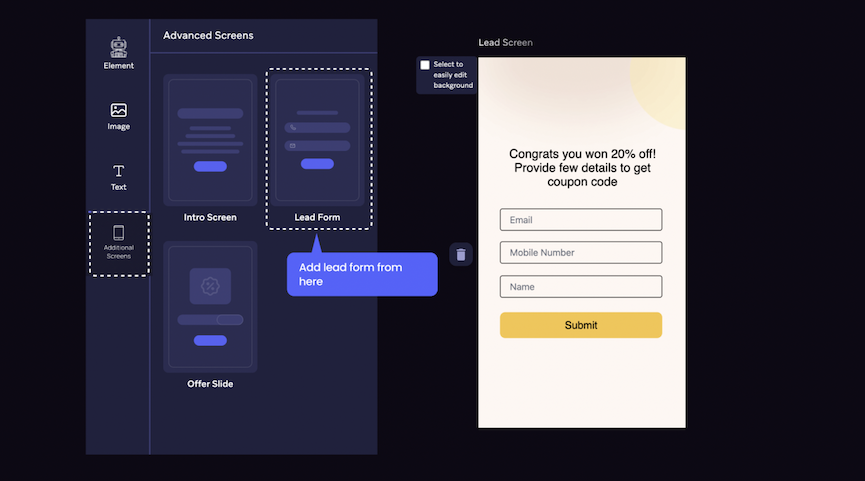
Users are 2-3X more likely to share first-party data like email or phone numbers after an engaging and rewarding brand experience. To add a lead capture screen, go to the **"Advanced Screen"** tab on the left & **select "Lead Form".**
Lead form will get added to the experience
Decide where to add the lead form—At the beginning or After the game/quiz
With the help of Lead Form, you'll be able to capture the following information of the participants-
1. Name
2. Email
3. Phone Number
4. A consent from the user around your company's terms & conditions/ privacy policy on acquiring their personal information. (You also get the option to add a custome URL redirection on this consent, eg-Privacy Policy Page of your website)
You have the functionality to choose to add all these input fields or select a combination of one or more as per your requirements on the lead form/ screen.
See how how to integrate campaign with [Mailchimp](/rhym-help-guide-and-faqs/integrations/integration-with-mailchimp.md) when you are collecting leads
See how to track leads in real time in the game dashboard from [here](/rhym-help-guide-and-faqs/analytics.md). You can also download leads as csv from the dashboard