> For the complete documentation index, see [llms.txt](https://docs.rhym.io/rhym-help-guide-and-faqs/llms.txt). Markdown versions of documentation pages are available by appending `.md` to page URLs; this page is available as [Markdown](https://docs.rhym.io/rhym-help-guide-and-faqs/how-to-create-campaign/how-to-create-games/flappy-bird.md).
# Flappy Bird
Sample Game [Link](https://testplay.rhym.io/custom-game?game=GAM625536972109)
## Video Tutorial - [Link](https://www.youtube.com/watch?v=vfx4Au0uFis)
## Introduction
Flappy Bird is a highly addictive & popular game where players guide a bird/or any object through gaps between obstacles. Its flying journey format also offers a unique opportunity to weave in your immersive brand's story through changing backdrops
## Edit Game
* Click game specific elements on the canvas to edit
* Game Specific Elements - Flying Object & the Obstacle
* Upload your own or choose from the library
* Follow suggested dimensions shown during upload
* These are static elements which you cannot drag or resize as it would impact game mechanics
* Click the canvas background to edit
* Add, edit, or delete graphics as needed
## Introduction Screen (Optional)
You can also add a starting instruction screen before the game starts, but it's not always required as the games on Rhym are either instantly familiar or have an intuitive, instant learning curve. This screen can only be added in the beginning
## Add End Screen with Offers & Call-to-Action
After interacting with a highly engaging, brand immerive gamified campaign, users often experience heightened positive emotions & a sense of accomplishment. Capitalize on this strong sentiment by providing offers basis performance & also or specific calls-to-action to drive traffic & sales
If you're looking to categorize scores for discount purposes, you could consider defining the buckets like this:
* 0-20
* 25-50
* 50+
## Add Lead Form (Optional)
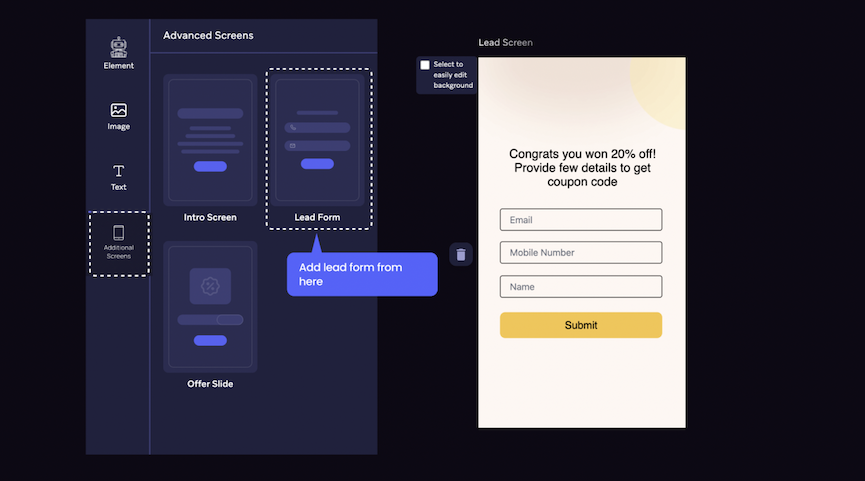
Users are 2-3X more likely to share first-party data like email or phone numbers after an engaging and rewarding brand experience. To add a lead capture screen, go to the **"Advanced Screen"** tab on the left & **select "Lead Form"**
If you have any queries or trouble around editing text, background or images, check [here](/rhym-help-guide-and-faqs/how-to-create-campaign/basics-of-editor.md)